Xilisoft Mobile Phone Manager
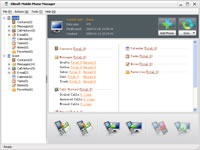
versione: 1.0.36.0807
peso: 7.81Mb
Possibilità di collegamento via USB e Bluetooth. All’avvio propone di creare un account presso Xilisoft (si fa tutto facilmente e velocemente direttamente dal programma). Il programma è disponibile in lingua inglese e cinese.
Una volta avviato clicchiamo su Add Phone per aggiungere il nostro dispositivo, il semplice wizard farà il resto.
Le funzioni del programma sono semplici e individuate da comode icone: creazione backup e ripristino dei dati, copia dei dati del telefono al pc e viceversa, copia dei dati del telefono in un’altro telefono, sincronizzazione telefono/pc.
Purtroppo non mi è stato possibile effettuare la prova vera e propria in quanto il mio dispositivo (Nokia N70) viene si riconosciuto ma rimane sempre in uno stato waiting; presumo perchè (come scritto nel sito) i dispositivi supportati sono quelli Windows Mobile.
pro: interfaccia facile ed immediata, funziona anche con Windows 7
contro: dispositivo mobile supportato Windows Mobile
Microsoft Phone Data Manager
versione: beta 2
peso: 4.12Mb
Purtroppo mi è stato impossibile provarlo in quanto è compatibile solo con sistemi 32bit, però a questo indirizzo è possibile sapere di più (requisiti, telefoni supportati, ecc…)
pro: sincronizzazione con USB, bluetooth e Wireless; se si ha un Windows Live ID è possibile memorizzare i contatti in Hotmail, diversi telefoni supportati
contro: è ancora in beta, supporto solo sistemi 32 bit
MOBILEdit! Lite
versione: 4.0
peso: 20.7Mb
All’avvio del programma il wizard guida facilmente l’utente, sono supportate le connessioni via USB/seriale, bluetooth, infrarossi, file (Android). Nel menù principale si hanno le funzionalità immediate di backup, lettura dei dati del telefono, scrittura dei dati nel telefono. Altre funzionalità interessanti sono la sincronizzazione (es. con client e-email) e funzionalità riguardanti audio, foto e video.
pro: supporto anche dei lettori di SIM, supporto di molti tipi di collegamento, supporto Windows 7, molti telefoni supportati, molte funzionalità disponibili (quindi non solo backup)
contro: è disponibile una versione gratuita Lite ma con funzionalità limitate dopo 30 giorni